
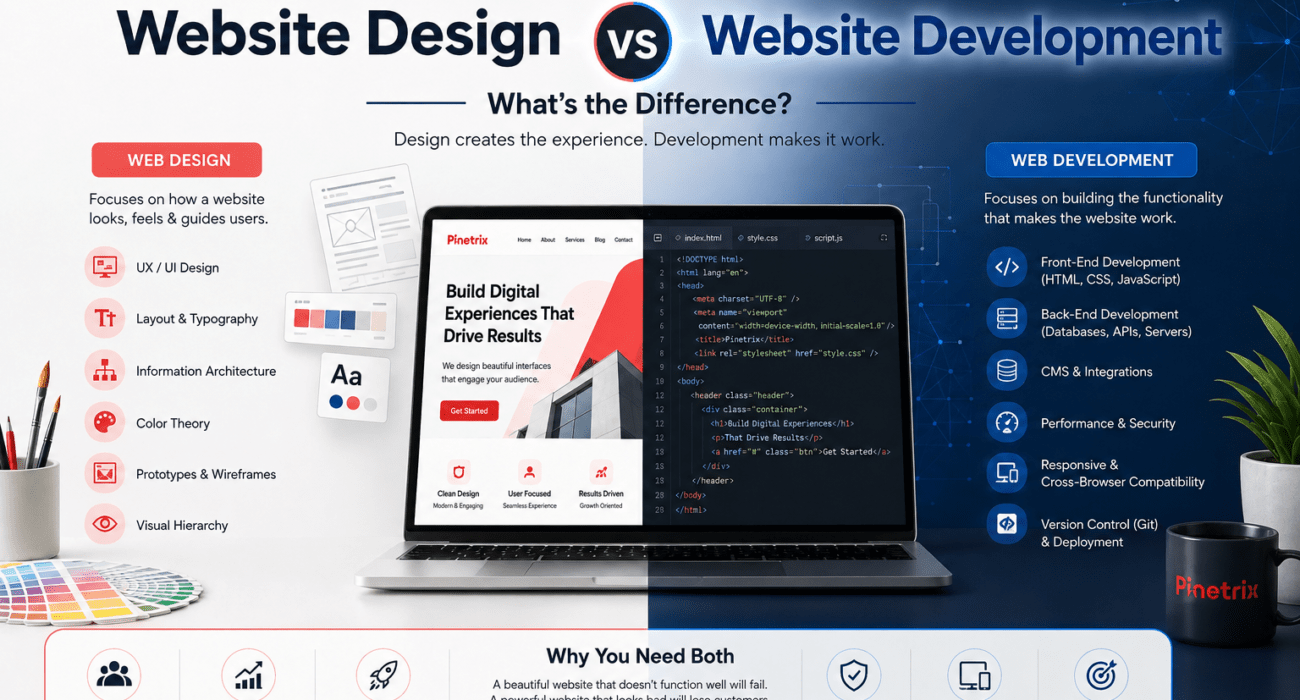
Website design focuses on how a website looks, feels, and guides users, while website development focuses on building the functionality that makes that experience work. At Pinetrix, we combine website design and development with SEO, Webflow services, Shopify services, and mobile application development to help businesses create digital experiences that are visually effective, technically reliable, and built for growth.
Web design focuses on how a website looks, feels, and guides users, while web development services focuses on building the functionality that makes that experience work. Designers typically handle UX, UI, layouts, typography, information architecture, and visual systems. Developers turn those designs into functional websites using technologies such as HTML, CSS, JavaScript, APIs, databases, and content management systems.
The difference matters when you’re building a new business website, redesigning an existing site, launching an online store, or developing a more complex digital product.
Website Design vs Website Development: The Quick Difference
| Web Design | Web Development | |
| Primary focus | User experience and visual presentation | Functionality and technical implementation |
| Main responsibilities | UX, UI, layouts, wireframes, typography, visual hierarchy | Front-end, back-end, APIs, databases, integrations |
| Typical tools | Figma, Adobe XD, Sketch, Photoshop | VS Code, GitHub, React, PHP, Node.js |
| Main output | Wireframes, mockups, prototypes, design systems | Functional, production-ready website |
| SEO contribution | Structure, usability, accessibility, content hierarchy | Performance, crawlability, technical SEO, schema |
| Typical specialists | UX/UI or web designer | Front-end, back-end, or full-stack developer |
The simplest way to remember it is:
Design decides how the website should work for the user. Development makes that experience work technically.
The distinction isn’t always completely rigid. Modern platforms such as Webflow increasingly blur the boundary between visual design and development, while experienced designers and developers often collaborate on UX, accessibility, performance, and implementation decisions.
What Does a Web Designer Do?
A web designer creates the visual and experiential foundation of a website. The role goes beyond making a page look attractive; it involves deciding how users find information, navigate the interface, and move toward important actions.
A designer may work on:
- User Experience (UX): How visitors navigate and interact with the website.
- User Interface (UI): The visual components users interact with.
- Information Architecture: How pages, content, and navigation are organized.
- Wireframes: Structural layouts created before detailed visual design.
- Mockups and prototypes: Representations of the proposed interface and user flow.
- Visual hierarchy: Using spacing, typography, size, and positioning to guide attention.
- Responsive layouts: Adapting the experience across desktop, tablet, and mobile screens.
- Accessibility: Designing interfaces that can be used by people with different abilities and assistive technologies.
- Brand identity: Translating a company’s visual identity into its digital experience.
Common tools include Figma, Adobe XD, Sketch, and Photoshop, although the tool itself does not determine whether a design is effective.
For example, placing a “Request a Quote” button isn’t simply a visual decision. A designer considers user intent, page hierarchy, contrast, mobile usability, surrounding content, and the stage of the buyer journey.
Good web design isn’t decoration. It is the deliberate design of an experience that helps users understand, navigate, and act.
What Does a Web Developer Do?
A web developer turns a website’s design and requirements into a functional, responsive, and technically reliable digital experience. Unlike software engineering, which can encompass broader software architecture and systems, web development specifically focuses on websites and web-based applications. Depending on the project, development can involve everything from front-end implementation to databases, APIs, authentication, third-party integrations, and server infrastructure.
Front-End Development
Front-end developers build the parts of a website users see and interact with directly.
Common technologies include:
- HTML5: Defines the structure and semantic content of a page.
- CSS3: Controls layout, styling, spacing, and responsive presentation.
- JavaScript: Adds interaction and dynamic behavior.
- React and Vue: Frameworks used to build component-based interactive interfaces.
Back-End Development
Back-end development handles the logic and systems operating behind the interface. Depending on the project, this can include:
- Databases
- APIs
- Authentication
- Server-side logic
- Payment and third-party integrations
- Business systems and data processing
Technologies can include PHP, Python, Node.js, and SQL, depending on the application’s architecture and requirements.
Full-Stack Development
A full-stack developer works across both front-end and back-end layers, which can be particularly useful when the interface, application logic, databases, and integrations need to function as one system.
But professional web development isn’t simply about writing code. A production-ready website also needs security, performance, responsive behavior, browser compatibility, maintainability, version control, and technical SEO.
That is why development quality can affect not only whether a website works, but also how reliably, securely, and efficiently it performs after launch.
Web Designer vs Web Developer: Who Does What?
The key difference between a web designer and a web developer is what problem each one primarily solves.
A web designer focuses on the user’s experience:
What should visitors see, understand, and do?
A web developer focuses on technical implementation:
How should we build, connect, and operate that experience reliably?
Consider a B2B company launching a new service page.
The designer may determine:
- Where the headline and value proposition appear
- How information is organized
- Where calls to action should appear
- How visitors move through the page
- How the layout adapts to mobile screens
The developer then turns that direction into a functioning page by:
- Building the page structure
- Implementing responsive behavior
- Connecting forms and integrations
- Optimizing loading performance
- Implementing technical requirements
- Testing across browsers and devices
The roles can overlap, especially in smaller teams, but they solve different primary problems.
Design creates the experience; development makes that experience functional, reliable, and scalable.
The strongest projects bring both disciplines together early rather than treating development as something that happens after the design is finished.
How Does Website Design Become a Working Website?
One of the biggest misunderstandings about website projects is assuming that a designer simply “hands over a design” and a developer turns it into code.
In a professional website project, the transition is more structured.
A typical workflow looks like this:
Business requirements → Information architecture → Wireframes → UI design → Design system → Developer handoff → Front-end development → Back-end/API integration → Testing → SEO and performance optimization → Launch
Each stage affects the next.
1. Requirements and Information Architecture
Before anyone starts designing screens, the team needs to understand the website’s purpose, target audience, content structure, conversion goals, and technical requirements.
Information architecture then determines how pages and information are organized. This can influence navigation, URLs, internal linking, content hierarchy, and ultimately how both users and search engines understand the website.
2. Wireframes and UI Design
Wireframes establish the structure before visual details are finalized.
The designer then develops the interface using elements such as typography, spacing, colors, buttons, cards, forms, imagery, and responsive layouts.
For larger projects, a design system can define reusable components and rules. This helps maintain consistency when dozens or hundreds of interface elements need to be developed.
3. Developer Handoff
A strong handoff isn’t simply sending a Figma link.
Developers need to understand:
- Component behavior
- Responsive breakpoints
- Typography specifications
- Spacing rules
- Interactive states
- Asset requirements
- Accessibility considerations
- Animation or interaction behavior
Modern handoff tools make this process more precise. Figma Dev Mode, Zeplin, Storybook, and browser inspect tools can help developers review dimensions, typography, spacing, assets, component behavior, and implementation details without relying entirely on screenshots or manual explanations. For larger projects, this reduces ambiguity between the approved design and the final implementation.
4. Development, Testing, and Launch
The developer implements the interface, connects required functionality, integrates APIs or third-party systems, and tests the website across browsers and devices.
Before launch, the website should also be checked for:
- Mobile responsiveness
- Broken links
- Form functionality
- Page speed
- Accessibility
- Security
- Metadata
- Structured data
- Indexability
- Core Web Vitals
This is why design and development should be planned as one workflow rather than two completely separate activities.
How Do Web Design and Development Affect SEO?
SEO doesn’t begin after a website has been developed.
Design and development decisions can influence organic search performance from the beginning.
How Design Can Affect SEO
Web design can influence:
- Information hierarchy
- Navigation
- Mobile usability
- Content readability
- Internal linking visibility
- Accessibility
- User experience
- Conversion paths
- Layout stability
For example, a visually impressive page that hides important content behind confusing navigation may create a poor experience even if the page looks modern.
Design should therefore support discoverability, usability, and content comprehension, not just aesthetics.
How Development Can Affect SEO
Development plays a major role in technical SEO because implementation can directly affect how search engines crawl, render, understand, and evaluate a website.
Developers may be responsible for implementing or supporting:
- Semantic HTML
- Page performance
- Core Web Vitals
- Image optimization
- JavaScript rendering
- Canonical URLs
- Redirects
- XML sitemap functionality
- Schema markup
- Mobile responsiveness
- Crawlability
- Server configuration
For example, a designer may create a beautiful animation-heavy interface, but if its implementation causes excessive JavaScript execution or poor loading performance, the technical implementation can undermine the intended experience.
The best approach is to involve SEO before launch, rather than treating it as a post-development repair job.
Design determines how effectively users experience the content; development determines how efficiently browsers, devices, and search engines can process the website. SEO connects both sides.
Where Does Webflow Fit Into Web Design and Development?
Platforms such as Webflow have changed the traditional distinction between web design and development.
With Webflow, teams can visually build responsive layouts, create reusable components, manage CMS content, add interactions, and control many aspects of the website without writing every element from scratch.
For businesses, Webflow can combine::
- Custom visual design
- Responsive development
- CMS functionality
- Marketing flexibility
- Visual editing
- SEO controls
- Faster content updates
But Webflow shouldn’t be treated as simply a “no-code replacement for developers.”
Understanding responsive design, accessibility, semantic structure, performance, SEO, CMS architecture, and interaction behavior is still important.
Webflow reduces some of the traditional coding requirements; it doesn’t eliminate the need for development knowledge.
For businesses, this distinction matters because a website can be visually created in Webflow and still require strategic planning, custom code, integrations, SEO configuration, and performance optimization.
What About Shopify Website Design and Development?
The same distinction applies to Shopify services, but e-commerce adds another layer: the website must not only look good and function correctly, but also help customers discover products and complete purchases efficiently.
A Shopify designer may focus on:
- Storefront layout
- Product-page UX
- Navigation
- Collection-page structure
- Branding
- Product discovery
- Mobile shopping experience
- Conversion-focused design
Development can involve:
- Shopify themes
- Liquid
- Custom functionality
- Apps
- APIs
- Payment-related integrations
- Inventory integrations
- Analytics
- Performance optimization
For example, an e-commerce designer might determine how product information, reviews, pricing, images, and CTAs should appear on a product page.
A Shopify developer then ensures the theme and functionality actually deliver that experience while integrating the systems the business needs.
This is why Shopify projects often require both strong UX thinking and technical implementation, particularly when a store needs custom functionality or integrations.
When Should You Choose Web Design, Development, or Both?
The right choice depends on what is actually preventing your business from achieving its goal.
A Quick Decision Guide
- Need a new brand identity, visual refresh, or better conversion flows? → Start with web design.
- Need custom features, API connections, faster load times, or database functionality? → Start with web development.
- Building a website from scratch, redesigning a site, or launching an online store? → You likely need both.
| Business Need | Best Starting Point |
| Outdated visual identity | Web design |
| Confusing navigation or UX | Web design |
| Website looks good but functionality is broken | Web development |
| Slow website | Development + technical SEO |
| New business website | Design + development |
| Website redesign and rebuild | Design + development |
| Online store | Design + Shopify development |
| Custom web application | UI/UX + development |
| Webflow marketing website | Web design + Webflow development |
| Poor organic visibility | SEO + design/development improvements |
For example, if visitors are struggling to find your services, changing the server or rewriting JavaScript won’t solve the underlying UX problem.
If the website has excellent UX but takes several seconds to load because of inefficient implementation, another visual redesign won’t solve the technical problem.
Start with the actual business problem, not with a job title.
Can One Person Be Both a Web Designer and Developer?
Yes. A professional can develop skills across both disciplines, and many modern web professionals do.
A designer with development knowledge can understand technical constraints before creating an interface. Likewise, a developer with strong design knowledge can build interfaces with better usability and visual consistency.
However, there is a practical limit to specialization.
For a simple business website, one experienced professional may be capable of handling design and development.
For a complex website, e-commerce platform, custom web application, or large-scale digital product, bringing together specialized expertise can reduce compromises and improve the final result.
The question isn’t whether one person can do both.
The better question is:
Does the complexity of your project justify specialized design and development expertise?
That distinction becomes increasingly important as a website evolves from a simple marketing asset into a system involving content, e-commerce, automation, APIs, customer data, and business operations.
How Much Does Web Design and Development Cost?
There is no single price for web design or development because the cost depends heavily on the project’s scope and technical requirements.
A simple brochure-style business website may require relatively little design and development work, while an e-commerce store or custom web application can involve significantly more research, design, integrations, testing, and ongoing maintenance.
The biggest cost factors usually include:
- Number and complexity of pages
- Custom UI/UX requirements
- CMS or e-commerce platform
- Third-party integrations
- Custom functionality
- APIs and databases
- Content migration
- SEO requirements
- Performance and security requirements
- Ongoing maintenance
Your hiring model also affects the budget.
| Hiring Model | Best For | Main Consideration |
| Freelancer | Smaller or focused projects | Lower overhead, but expertise can vary |
| Agency | Complex projects and ongoing support | Higher investment, broader capabilities |
| In-house team | Companies with continuous development needs | Higher long-term employment cost |
Rather than comparing design and development by price alone, businesses should compare the value and scope of the final solution. A cheaper website that requires major redevelopment six months later can cost more than a properly planned project from the beginning.
What Does a Business Actually Need: Design, Development, SEO, or More?
A modern website rarely operates as an isolated piece of software.
Businesses often need a combination of design, development, search optimization, e-commerce, automation, and mobile experiences depending on their goals.
For example:
A new business website may require UX/UI design, website development, content, and SEO.
An e-commerce business may need Shopify design, Shopify development, product optimization, and SEO.
A company building a digital product may need UI/UX, web development, APIs, databases, and mobile application development.
An established website losing organic traffic may need technical SEO, content optimization, performance improvements, and development support rather than another visual redesign.
This is why choosing individual services in isolation can sometimes create unnecessary gaps between strategy, design, technology, and growth.
How Pinetrix Helps Businesses Build and Grow Digital Experiences
At Pinetrix, we approach websites as business assets rather than treating design and development as disconnected tasks.
Our capabilities cover the areas businesses commonly need before, during, and after a website project.
Website Development
Pinetrix provides website development services for businesses that need functional, responsive, and scalable digital experiences, including custom functionality, CMS implementation, integrations, and performance-focused development.
SEO
Pinetrix’s SEO services help businesses improve organic visibility through technical optimization, on-page improvements, content strategy, and search-focused website enhancements. Bringing SEO into the website process early can prevent technical and structural issues from becoming post-launch problems.
Webflow Development
For businesses that need design flexibility and easier content management, Webflow development services provides a practical middle ground between custom website development and visual site management. Pinetrix can support Webflow planning, development, optimization, and ongoing improvements.
Shopify Development
For e-commerce businesses, Shopify development services combines storefront design with the functionality required to operate an online store, including theme customization, integrations, storefront improvements, and technical optimization.
Mobile Application Development
When a business needs functionality beyond the browser, mobile application development can extend its digital experience to smartphones and connect applications with business systems, APIs, and data.
Together, these capabilities allow businesses to approach their website, SEO, e-commerce, and mobile experiences as connected parts of a broader digital strategy.
Final Takeaway: Design and Development Work Best Together
Successful websites require more than either design or development alone.
A strong digital presence combines thoughtful UX, reliable development, technical SEO, fast performance, accessible interfaces, and technology that fits the business model.
Whether you’re building a new website, redesigning an existing one, launching a Shopify store, developing with Webflow, improving organic visibility, or expanding into mobile applications, the most effective approach is to consider the entire digital experience rather than treating each service as a separate task.
The goal isn’t simply to build a website that looks good. It’s to build a digital experience that works for users, search engines, and the business behind it.
Talk to Our Experts Today To Discuss Your Website
Frequently Asked Questions
What is the difference between web design and web development?
Web design focuses on the website’s user experience, interface, visual hierarchy, layout, and overall appearance. Web development focuses on implementing those designs as a functional website using front-end and back-end technologies, integrations, databases, and other technical systems.
Do web designers need to know coding?
Not necessarily. A web designer can specialize in UX and UI without being an experienced programmer. However, understanding basic HTML, CSS, responsive behavior, accessibility, and development constraints can help designers create more practical interfaces and collaborate more effectively with developers.
Do web developers design websites?
Some developers have strong design skills, but development and design are different disciplines. A developer’s primary responsibility is usually technical implementation and functionality. On larger projects, dedicated designers and developers often work together so that visual, usability, and technical requirements are properly addressed.
Should I hire a web designer or developer first?
It depends on the project. If you are creating a new website, design and development should ideally be planned together. If your existing website has poor UX, start with design improvements. If the design is effective but the website has technical problems, performance issues, or missing functionality, development may be the priority.
Can one person do web design and development?
Yes. Some professionals have skills in both areas, and this can work well for smaller websites. More complex websites, e-commerce stores, and custom applications may benefit from specialized design and development expertise because they involve more detailed UX, technical architecture, integrations, testing, security, and performance requirements.
Is Webflow web design or web development?
Webflow combines elements of both. Its visual interface allows designers and developers to build responsive websites visually, while features such as CMS functionality, interactions, custom code, and technical configuration make development knowledge valuable. Webflow therefore sits between traditional design and development workflows.
How does web development affect SEO?
Development can directly affect technical SEO through page speed, Core Web Vitals, HTML structure, JavaScript rendering, crawlability, mobile responsiveness, redirects, structured data, and other technical factors. A website can have excellent content but still face search performance problems when its technical implementation creates barriers for users or search engines.